RewardsLoyaltyInfoPageWidget
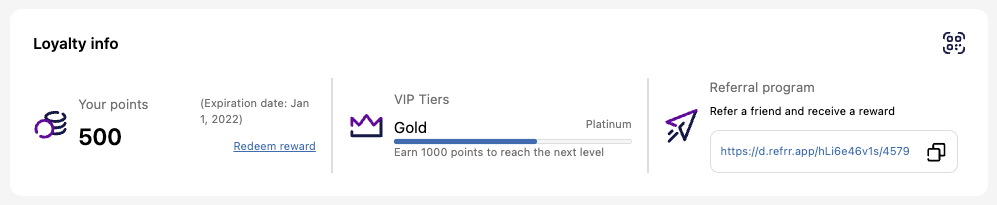
This widget displays a summary of a customer's loyalty program status, including points balance, tier progress, and referral options. It's designed to give customers a quick overview of their engagement and encourage further participation.
What the widget shows
-
Points balance — Displays the current point balance and expiration date, if point expiration is enabled.
-
"Redeem reward" link — Leads to the store homepage and opens the Rewards popup by default.
-
VIP Tier status — Shows the customer's current tier and a progress bar indicating how close they are to the next tier.
-
Referral program — Displays a referral section with a copyable referral link.
-
Loyalty QR — Displays a QR code icon. When clicked, it opens a modal window with the customer's personal loyalty QR code, which can be scanned to interact with their loyalty profile.
Activating the widget
To display this widget in the storefront after integrating, go to Growave admin → Rewards → Settings → General and enable relevant programs (Points, Referrals, VIP tiers). In the Loyalty QR section, select the Enable loyalty QR checkbox and choose a code type: 1D barcode or 2D QR code.
The Loyalty Info widget only displays features from programs that are currently enabled and configured. Ensure the Points, VIP Tiers, Referrals, and Loyalty QR features are activated in their respective sections of the Growave admin.
Widget example
Code
<div
    class="gw-rd-loyalty-info-page-widget-placeholder"
    data-gw-widget-shadow-root-enabled="true"
    data-gw-custom-redeem-link="https://example.myshopify.com/redeem"
    data-gw-custom-points-img-url="https://example.myshopify.com/cdn/shop/files/points.jpg"
    data-gw-custom-referral-img-url="https://example.myshopify.com/cdn/shop/files/referral.jpg"
    data-gw-custom-vip-tiers-img-url="https://example.myshopify.com/cdn/shop/files/tiers.jpg"
    style="display: block"
></div>
Attributes
Attributes
data-gw-widget-shadow-root-enabled?optional- Enables or disables the use of the Shadow DOM for the widget. Set to "true" to encapsulate the widget's styles and structure within the Shadow DOM, preventing style conflicts with the rest of the page.
data-gw-custom-redeem-link?optional- Specifies a custom URL for the "Redeem reward" link.
data-gw-custom-points-img-url?optional- Sets a custom image URL for the points balance section.
data-gw-custom-referral-img-url?optional- Sets a custom image URL for the referral section.
data-gw-custom-vip-tiers-img-url?optional- Sets a custom image URL for the VIP tiers section.