RewardsReferralProgramPageWidget
This widget outlines the steps involved in the referral process, highlights the rewards for both the referring customer and referred friend, provides a unique referral link, and offers sharing options through social media channels.
Activating the widget
To enable this widget, go to Growave admin -> Rewards -> Settings. In the "Referral program status" section, click the "Enable" button next to the "Program is currently" block. Once enabled, this block will display "Program is currently Enabled".
Widget example
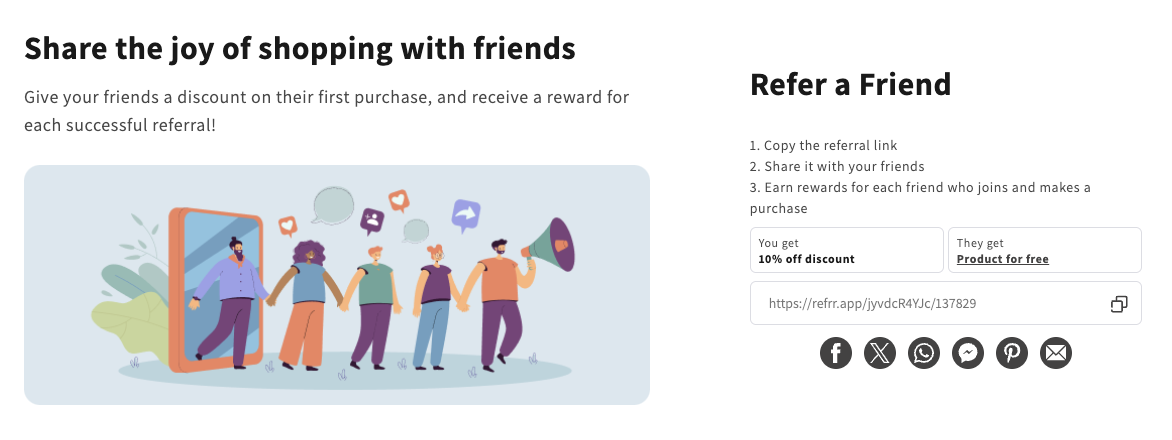
Code
<div
    class="gw-rd-referral-program-page-widget-placeholder"
    data-gw-img-url="https://example.myshopify.com/cdn/shop/files/example.jpg"
    data-gw-widget-shadow-root-enabled="true"
    style="display: block"
></div>
Attributes
Attributes
data-gw-img-url?optional- Specifies the URL of the image to be displayed in the widget. This can be used to customize the visual appearance of the referral program page.
data-gw-widget-shadow-root-enabled?optional- Enables or disables the use of the Shadow DOM for the widget. Set to "true" to encapsulate the widget's styles and structure within the Shadow DOM, preventing style conflicts with the rest of the page.